Kaia is a Cozi alternative for families who want help with the work of organizing, including schedules, meals, reminders and household questions. Cozi brings information into a dedicated app; Kaia brings an assistant into your existing family conversation. Start with one recurring task you want off your plate.
Your family already checks the group chat.
If keeping Cozi up to date has become another job, try putting the next plan where your family already talks. Kaia helps with schedules, meals and household details inside that conversation. The new pickup time should not need a second round of explaining.
Start with the Cozi information you will need next week: upcoming dates, a current shopping list and the meals already agreed. Keep the old organizer available while you test one busy evening with Kaia. There is no prize for moving every completed task on day one.
Separate a missing feature from a missing habit
Cozi combines family dates, shopping lists, to-dos and meal-related planning. If you like having those together but someone never checks the app, the problem may be the shared routine rather than the list of features.
Ask each adult to describe where they look for tomorrow’s plan. If the answers differ, agree on that first. Otherwise the same disconnect can follow you into the next app.
Moving from Cozi: test one changed dinner plan
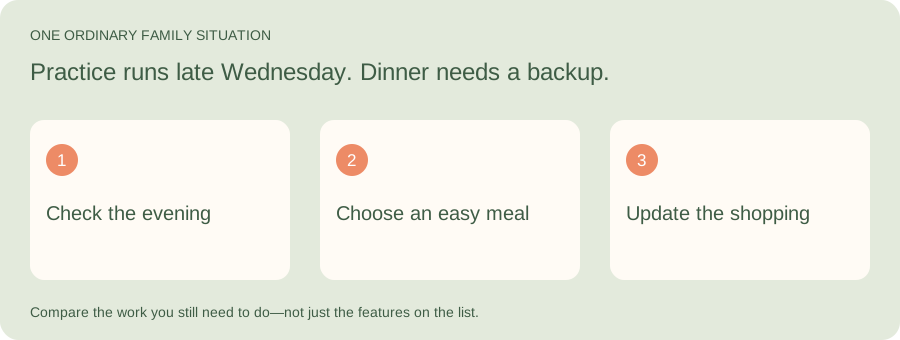
Illustrative family situation: Practice runs late Wednesday. Dinner needs a backup.
An alternative should improve the job that brought you here. Try Kaia on a real dinner decision before moving your whole household routine. Notice whether you spend less time turning the conversation into a usable plan.
| Part of the job | What to look for |
|---|---|
| Keep | The useful dates and routines your family already relies on |
| Change | The repeated explaining and list updates you want help with |
| Try | Give Kaia the busy evening and ask for a dinner plan |
What to carry over from Cozi first
Use a short moving list rather than rebuilding the whole organizer. Here is an illustrative starting point; enter or verify these details yourself rather than assuming every type of information transfers automatically.
| Information | Keep for the first week | Check before you stop using the old plan |
|---|---|---|
| Dates | Upcoming appointments, recurring activities and pickup details | The next occurrence, time and person doing transport |
| Shopping | Items still needed, quantities and anything already bought | The shopper can find the current list |
| Meals | The dinners already agreed and any ingredients to use | The plan fits the actual evening |
| Household jobs | Current responsibilities and the next deadline | A named owner has the information to act |
Cozi vs Google Calendar
Consider Google Calendar when dates are the main job and your household already uses Google accounts. Make a short list of anything you currently keep alongside dates: groceries, meal ideas or recurring household tasks. Decide where those would live before moving.
If your reason for switching is broader household lists, compare the FamilyWall alternative approach before choosing what to move.
| Your reason for leaving | An approach worth trying |
|---|---|
| I only need a shared schedule | Google Calendar or TimeTree |
| I want another full family organizer | FamilyWall |
| The children need to see the day without a phone | Skylight or Hearth |
| I want to begin with a message instead of another app | Kaia |
Cozi vs Skylight
This is partly a choice about location. An app travels with the person; a display gives the plan a home in the room. If your child keeps asking what is next, a display may solve a different problem from the one you solve on your phone. Try writing tomorrow’s plan on paper in the proposed spot before buying hardware. Does anyone look?
Cozi vs TimeTree and FamilyWall
TimeTree focuses on sharing calendars across groups. FamilyWall offers a broader household-organizer approach. Start by checking the particular job that matters to you, rather than moving because one app has a longer menu.
A useful comparison is an updated pickup plus a grocery item added by someone else. Can both adults see what changed, and can they tell what still needs doing?
Where Kaia fits
Kaia is built around existing iMessage conversations. If your family already discusses plans in chat but those plans never quite make it into the organizer, that is the gap to consider. It is a different interaction style, not a requirement to abandon every calendar you have.
Start with the job you want off your plate
Try this with Kaia: “Practice moved to Thursday at 5. Help us update the plan and work out pickup.”
Keep the useful parts of your current routine. Let the next task show you where a family assistant can make the week easier.
Why we built a different starting point
We are parents and co-parents with families of our own. After trying different apps and devices, we still found ourselves doing the remembering, updating and following up.
That is why our first question is not how many features an organizer has. It is who keeps the plan useful after everyone signs up. Try Kaia with one change to the week and look at the work that remains for you.
See a worked family example
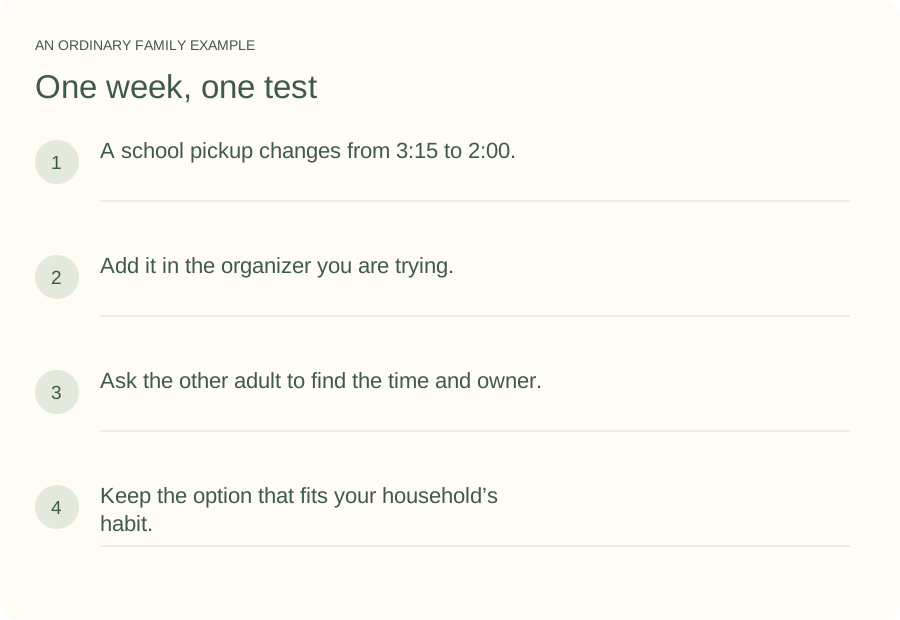
Illustrative household example; adapt the names and details to your week.
A few common questions
Is there a free alternative to Cozi?
A shared calendar can be enough when you mainly need dates. Compare the free plan of any organizer against the tasks you actually use; a free calendar alone may not replace your existing lists and meal planning.
Can I move everything from Cozi automatically?
Available export and subscription options depend on the service and type of information. Check the current support instructions before moving. Do not assume a calendar subscription also transfers tasks, shopping lists or recipes.
Which Cozi alternative is best for a busy family?
Choose by the bottleneck: seeing the plan, entering it, sharing it or acting on it. Test your top two options with the same ordinary week before changing the whole household’s routine.
How do I try Kaia with my family?
Start with one ordinary family task. Practice moved to Thursday at 5. Help us update the plan and work out pickup. Use the Get started link to begin with Kaia, then build from the first useful task.